
 Sakshi Singh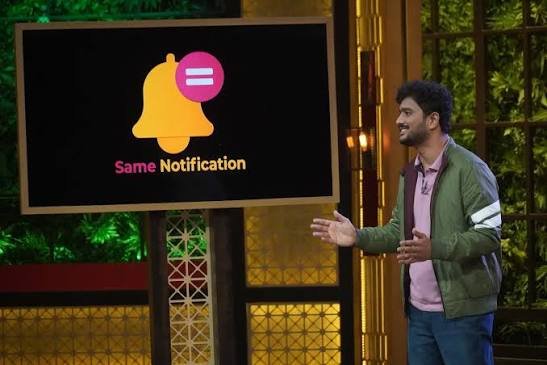
Same Notification is a mobile application designed to mirror notifications from one smartphone to another in real time. The app aims to help users keep track of important alerts across two devices, with potential uses ranging from family communication to small business operations.
The service allows users to pair phones through a QR code or a short code. Once connected, users can choose which applications’ notifications they want to share with the paired device. Supported use cases highlighted by the company include alerts from messaging apps, email services and social media platforms.
Same Notification also attracted attention through its listing as a startup associated with Shark Tank India Season 2. According to the supplied deal information, the business sought ₹25 lakh in exchange for 15% equity, implying a valuation of approximately ₹1.67 crore. The listing records that the founders did not secure an investment from the show’s sharks.
The app addresses a familiar problem for people who use multiple smartphones or need to keep track of alerts arriving on another person’s device with their permission. Rather than repeatedly checking two phones, users can receive selected notifications on a paired device.
What Is Same Notification?
Same Notification is a notification-sharing app that allows alerts received on one phone to appear on another connected phone.
Notifications can include messages, emails, order updates and other app alerts. Instead of manually checking the original device, users can view selected notifications on the paired smartphone.
The company presents the service as a simple way to keep two devices in sync. Its stated features include real-time notification mirroring, QR-code pairing, app-level selection and the option to disconnect devices.
The app may be useful in situations where people need access to particular alerts but do not want to carry or constantly check multiple devices.
For example, a small business owner may want to receive order notifications that arrive on a staff member’s phone. A parent may want to receive selected alerts from a child’s device, subject to appropriate consent, age considerations and privacy boundaries.
The usefulness of the service depends on the phones, apps and notification permissions involved. Notification mirroring also does not necessarily mean that users can access the complete contents of the original phone or control its applications.
How Does Same Notification Work?
Same Notification is designed to make the pairing process straightforward. According to its product description, users can connect two phones by scanning a QR code or entering a short code.
After pairing, users select which apps they want to share notifications from. The service then mirrors eligible alerts to the connected device as they arrive.
Its main features include:
- Real-time notification mirroring: Selected notifications can appear on the paired phone shortly after arriving on the original device.
- Quick pairing: Users can connect devices through a QR code or short code.
- App selection: Users can choose which applications are included in notification sharing.
- Connection controls: Users can disconnect paired devices when they no longer want to share alerts.
The app’s stated approach gives users control over which notifications are shared rather than automatically forwarding every alert.
However, actual performance may depend on operating-system permissions, battery optimisation settings, internet connectivity and the notification behaviour of individual apps. Users should also check the app’s current permissions and privacy policy before enabling access to sensitive notifications.
How Same Notification Can Help Parents and Families
One of the use cases highlighted by Same Notification is family safety.
Parents may want to remain aware of important communications involving their children, particularly when a child uses a smartphone for school, social activities or everyday communication.
A notification-sharing tool can help parents receive selected alerts on another device. However, the technology should be used transparently and in a way that respects a child’s age, privacy and developing independence.
Notification mirroring is not the same as a complete parental-control system. It does not necessarily provide location tracking, screen-time management, website filtering or comprehensive access to a child’s phone.
Families considering such an app should establish clear expectations about which notifications are shared and why. Open communication can help distinguish reasonable safety measures from unnecessary monitoring.
The company positions Same Notification as a way to stay informed without taking the original phone away from its user. Whether it is appropriate depends on the family’s circumstances and how the feature is used.
Why Couples May Use Same Notification
Same Notification also identifies couples as a potential audience.
Partners may want to share important alerts, such as delivery updates, account notifications or messages relevant to household arrangements. For people who manage shared responsibilities, receiving selected alerts on a second device can reduce the need to check another phone repeatedly.
For instance, a person waiting for a delivery could receive a relevant notification on a paired phone if the original device receives the alert and the app is configured to share it.
However, sharing notifications can expose private messages, account information and personal details. Both partners should agree on what is shared and understand how to disconnect the devices.
The app’s selective-sharing feature may help users limit the information they forward. Still, users should avoid sharing sensitive financial, authentication or personal notifications unless they understand the associated privacy risks.
Same Notification for Small Businesses
Small businesses are another potential use case for notification mirroring.
Many small businesses rely on smartphones to manage customer conversations, incoming orders, payment alerts and delivery updates. When these notifications arrive on a single employee’s phone, the owner or another team member may not see them immediately.
A notification-sharing app can help make selected alerts available on a second device. This could be useful for businesses in which several people need to stay informed about incoming customer activity.
For example, a business owner may want to receive order alerts that arrive on a staff member’s phone. Similarly, a team member responsible for fulfilment may need to know when a new order or customer message comes in.
However, notification mirroring is not a full customer relationship management system or order-management platform. It does not automatically provide shared records, task assignments, reporting or centralised customer histories.
Businesses should also consider who can view the mirrored alerts, especially when notifications contain customer contact details, payment information or other confidential data.
Privacy and Security Considerations
Because notification-sharing apps can handle sensitive information, privacy is an important consideration.
Depending on the apps involved, notifications may contain personal messages, email previews, customer details or financial alerts. Giving an application notification access can therefore expose information beyond simple reminders.
Same Notification says users can choose which applications to mirror and disconnect a paired device when needed. These controls can help limit sharing, but users should review the app’s actual permissions and data-handling practices before relying on them.
Before pairing two devices, users should consider the following:
- Share only notifications that the other device genuinely needs.
- Review the permissions requested by the application.
- Avoid exposing passwords, one-time passcodes and sensitive financial alerts.
- Disconnect devices when sharing is no longer necessary.
- Ensure that the other person understands and agrees to the arrangement.
The presence of a pairing code or selective-sharing feature does not, by itself, establish how an app encrypts, stores or processes notification data. Users should consult the developer’s privacy policy for those details.
For families and businesses, clear boundaries are especially important because a single notification may reveal information about people other than the device owner.
Same Notification on Shark Tank India Season 2
Same Notification was listed among the businesses associated with Shark Tank India Season 2, which provides a platform for entrepreneurs to present products and seek investment from a panel of investors.
According to the supplied deal listing, the startup requested ₹25 lakh for 15% equity.
That offer implied a business valuation of approximately ₹1.67 crore. However, the listing records that the startup did not receive an investment from the sharks.
The available information does not specify the full details of the pitch, the reasons the investors declined or the company’s financial position at the time.
An unsuccessful pitch does not necessarily determine a startup’s future prospects. Businesses may continue developing their products, seek funding elsewhere or change their commercial strategy after appearing on television.
For a technology product such as Same Notification, longer-term performance would depend on factors such as user retention, compatibility, privacy safeguards, reliability and the ability to establish a sustainable business model.
What Lies Ahead for Same Notification?
Same Notification targets a practical challenge created by the widespread use of smartphones: important alerts can be spread across different devices, making them harder to track.
Its approach is to let users choose selected notifications and mirror them to another phone. This could offer convenience for households and small businesses that need access to specific information across devices.
However, notification-sharing applications also operate in a privacy-sensitive environment. Their long-term value depends on balancing ease of use with clear permissions, dependable performance and responsible data handling.
The app’s stated features provide a straightforward starting point for users who want to keep selected alerts in sync. Before adopting it for family or business use, customers should confirm device compatibility, review current permissions and understand how their data is handled.
Same Notification’s core proposition remains simple: users should not have to keep checking two phones to stay informed about the alerts that matter to them. Its broader success will depend on how reliably and securely it delivers that convenience.
Most Searched FAQs
1. What is Same Notification?
Same Notification is a mobile app designed to mirror selected notifications from one smartphone to another in real time. It is intended for personal, family and small-business use cases.
2. How does Same Notification work?
Users can pair two phones using a QR code or short code, then select the apps whose notifications they want to share. Eligible alerts are mirrored to the paired device.
3. Did Same Notification get a deal on Shark Tank India?
According to the supplied deal information, Same Notification did not receive an investment from the sharks on Shark Tank India Season 2.
4. How much money did Same Notification ask for on Shark Tank India?
The supplied listing states that Same Notification asked for ₹25 lakh in exchange for 15% equity, implying a valuation of approximately ₹1.67 crore.
5. Can Same Notification mirror WhatsApp and Gmail alerts?
The product description lists WhatsApp, Gmail, Instagram and other applications as examples of notifications users may choose to mirror. Actual availability can depend on device compatibility, permissions and app settings.
6. Is Same Notification safe to use?
Safety depends on the app’s permissions, security practices and data-handling policies. Users should review the privacy policy, share only necessary notifications and avoid exposing sensitive information on another device.
Read also:Shivangi Joshi Biography: Age, Family, Boyfriend, Career, TV Shows, Awards & Lock Upp 2